


Your online presence tells people who you are when you’re not in the room. Search results, profiles, and images quietly influence how others judge you.
Many people never check what shows up for their name until there’s a problem. By then, the narrative is already set.
This guide will show you exactly how to check your online presence (the way other people see it) so you can take back control of that narrative.
What is Online Presence?
Your online presence consists of everything about you online that could be found by others. When people type your name into Google or search you on social media, whatever shows up shapes how people think about you, your business, or your brand.
It includes both content you control and content you don’t control. This can include:
- Search engine results (Google, Bing, etc.)
- Social media profiles and posts
- Personal or company websites
- News articles, press mentions, and reviews
- Images and videos
- Directory listings and data broker profiles
- Comments, forum posts, or tagged content
- AI summaries from Google, ChatGPT, Claude, etc
Why is it Important to Check Your Online Presence?
If you don’t check your online presence, you have no idea what people might see when they’re searching your name. Whatever they find can have major implications in your life. When people search for you online, they want to know:
- who you are
- whether or not they can trust you
If you’re not telling them who you are, someone else will.
Many of our clients have trouble getting a job, attracting clients, or even finding a date because of something negative showing up on their first page of search results. And often, they only realize it’s there after they get a rejection.
If you check it now, you know what’s there and can start taking steps now to get rid of anything negative, before someone important finds it.
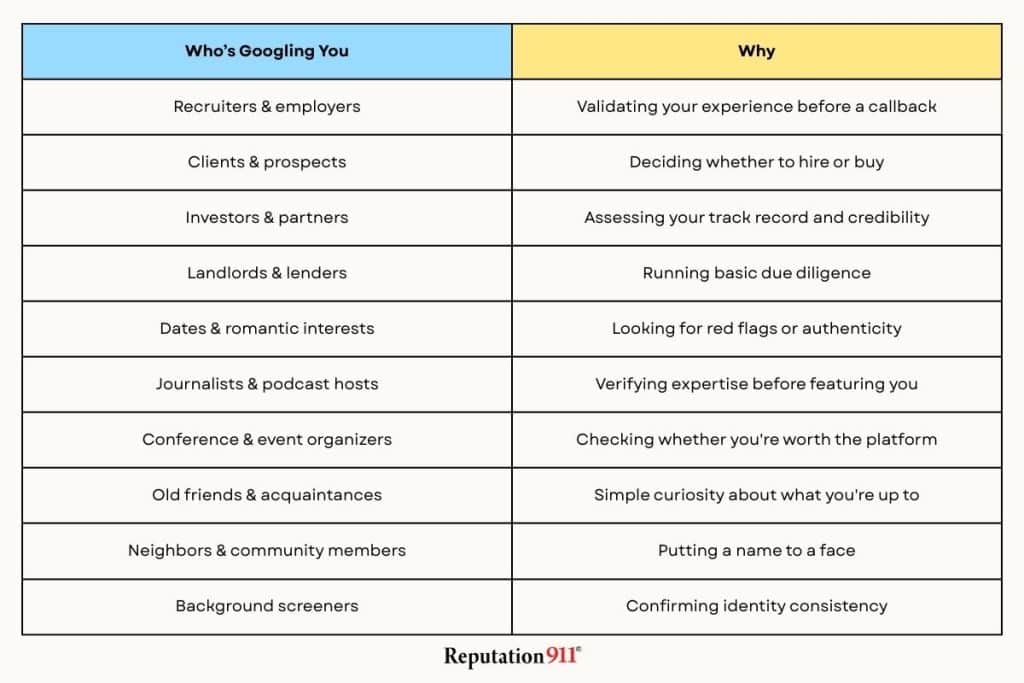
Below are the most common reasons people look you up online, plus how to evaluate your own presence.
Professional & Career Reasons
One of the most common reasons people search for you online is to evaluate you in a professional context–like a pre-interview before you get a callback from a hiring manager.
Who’s checking and why:
- Employers and recruiters validate your experience, professionalism, and cultural fit.
- Clients or prospects assess credibility before hiring or buying.
- Investors or partners gauge your track record, expertise, and reputation.
- Vendors or collaborators confirm legitimacy.
Inconsistent titles, outdated bios, or a lack of presence can quietly disqualify you before conversations begin.
Example:
We had a client whose estranged spouse made a false accusation against them. The accusation was logged in a divorce court document, which was published to an online court record search website. The online listing for the record became the first result people found when they searched for his name.
By the time he came to us to remove the court record from his search results, he had already been rejected from a job he had applied for and had later lost a business deal.
Brand & Authority Evaluation
In your professional life, others will often assess your online presence to judge your authority and credibility in your field.
- Journalists verifying expertise and sources.
- Conference planners assessing speaker credibility.
- Podcast hosts evaluating relevance and authority
- Customers are looking for social proof and thought leadership.
They’re looking for content that demonstrates your knowledge. This is where having no online presence can backfire, even if there’s nothing negative about you out there.
For example, if a conference planner wants to hire you as a keynote speaker and they can’t find previous examples of your work online, they’ll pass you over.
Trust, Safety & Risk Checks
In certain situations, people use online searches to identify potential risks.
- Landlords, lenders, or schools performing basic due diligence
- Background screeners validating identity consistency.
- Event organizers or media reviewing prior conduct.
- Dating or personal connections, looking for red flags or authenticity
They’re looking for any information that could be concerning. Even neutral information, like mismatched details, can raise doubts when trust and safety are involved.
Personal Curiosity
Sometimes, people search for you online simply because they’re curious. This could be:
- An ex or old friend wondering what you’ve been up to
- New connections from a date, party, or mutual friend
- Neighbors or community members trying to put a name to a face
People naturally want context (and are nosey). If they find something embarrassing, or even nothing at all, they could judge you for it on a personal level.
Here’s an example of how this can play out:
We had a client who came to us to remove something that she didn’t want her family to find. She went onto a prayer request website to submit a prayer for her overweight family member to lose weight. Months later, she Googled her name and saw the prayer fully written out as a Featured Snippet on her first page of search results. If it got back to that family member, it would have made things quite awkward at dinner.
Anything you type on a site, you have to assume that the website could post it publicly–even something that you thought was private.
Verification & Consistency Checks
People often cross-reference your information online. To a stranger who doesn’t know your history, inconsistency can look suspicious.
A recruiter checks your LinkedIn title against your resume. A client Googles your company after reading your bio. A journalist verifies your credentials before quoting you. It takes about thirty seconds. If they can’t verify something, you might not hear back from them.
Reputation Management (Good or Bad)
Organizations Google people before bringing them in. Anyone considering attaching their name to yours (employers, boards, universities, media outlets, conference organizers, etc) will check whether you’re a reputational risk first. It doesn’t matter how qualified you are.
They’re looking for:
- Reviews or public complaints
- Controversies or public disputes
- Past statements that haven’t aged well
- General online behavior and tone.
It doesn’t even take a huge scandal to make someone pause. Even something you were only loosely connected to can be enough to lose an opportunity.
I’m Not On Social Media, Do I Still Have an Online Presence?
Social media is only one piece of your online presence. You likely still have an online presence regardless of whether you use the internet at all.
But if you don’t have established channels to post content (website, social media, etc), you might be even more susceptible to reputational threats–because other people can still post things about you.
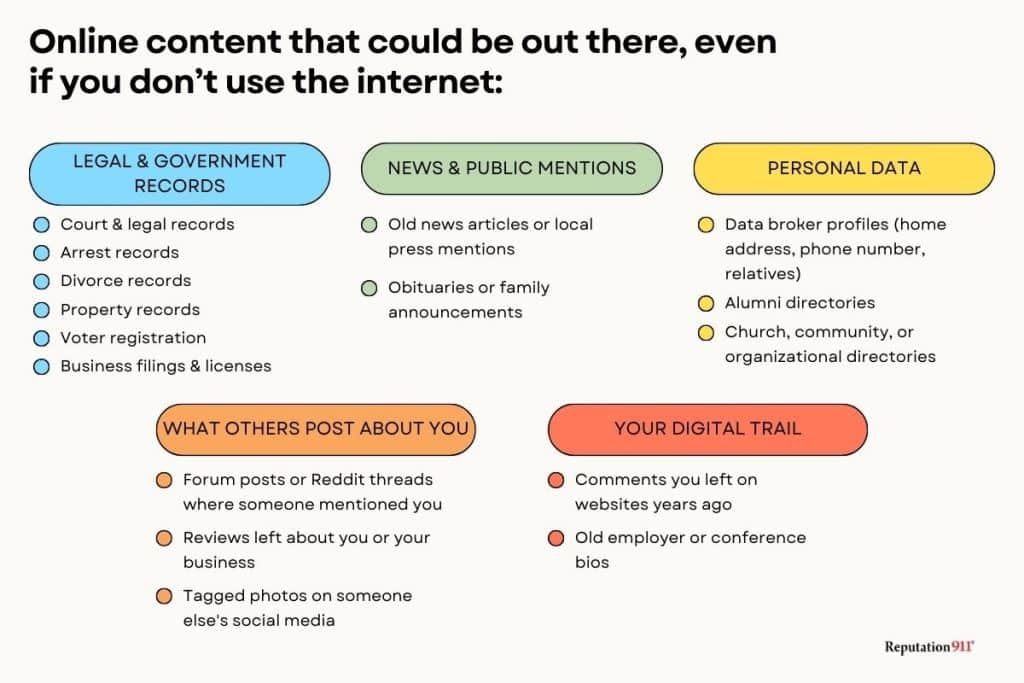
Google’s algorithm gives high authority to “citable sources”, like forum threads, public record sites, news outlets, etc. If you have never posted anything that could rank for your name, the second something negative gets posted about you, it instantly ranks on the first page of search results for everyone to see.
If you’re not actively shaping your online presence, you have no defenses against reputational attacks.
How to Check Your Online Presence (Step-by-Step)
Below is a practical, step-by-step approach to understanding and improving what the internet says about you.
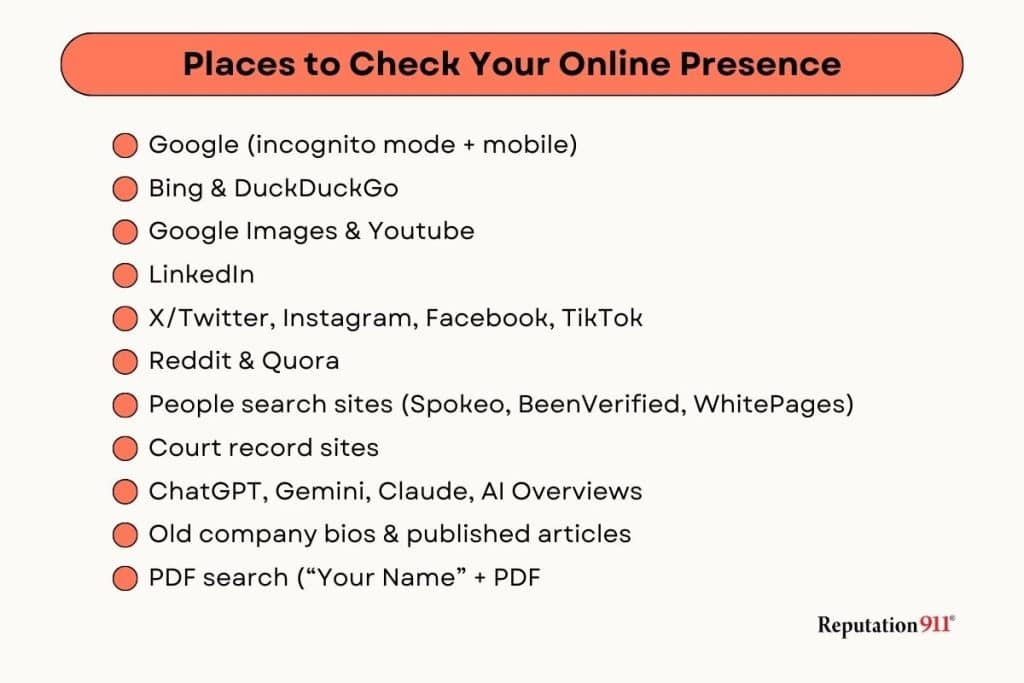
1. Use Search Engines
Start by seeing what shows up when someone searches your name. Open Google in an incognito window and search your full name. Then search variations on your name–nicknames, name + your city, name + your employer, etc.
Most people don’t look past the first page of Google. But the people doing serious due diligence on you often do. Review at least three pages. Content sitting on page two today can move up tomorrow if it gets traffic or a new link pointing to it.
As you scan the results, ask yourself whether the content reflects how you want to be seen.
Don’t stop at Google. Run the same search on other popular search engines like Bing and DuckDuckGo. Not everyone uses Google, and the algorithms different search engines use might display different content.
2. Review Social Media Visibility
Your social media profiles are usually the next thing people click after your name appears in search results. Focus on the major platforms that matter for your work or search visibility.
Log out of every platform and look at your profiles the way a stranger would.
- Is your bio current?
- Do your photos and tone feel consistent across platforms?
- Is anything visible that you wouldn’t want a client, employer, or colleague to see?
Search your name on LinkedIn, X/Twitter, Instagram, Facebook, TikTok, Medium, and anywhere else you’ve had a presence–even platforms you haven’t used in years.
For a full walkthrough of cleaning up what you find, read our guide here: Cleaning Up Your Social Media Accounts.
3. Check Image & Video Results
Images and video are often more impactful on someone’s impression of you than written content.
When you Google yourself, don’t forget to check the Images and Video tabs to see what comes up. Search YouTube, TikTok, or Vimeo if you’ve ever had a presence there. Note any old headshots, tagged photos, and anything else that doesn’t reflect who you are today.
For photos you’re worried about, run a reverse Google image search to see where else they might be living online. Anything on platforms you control (website, profiles, etc), you can delete directly. You also have options to remove images from Google if they live on platforms you don’t control.
4. Check Forum Sites
Forum sites like Reddit and Quora rank surprisingly well on Google now. These platforms are treated as high-authority sources because they host authentic, constantly updated conversations, which is what Google’s algorithm rewards. That means a single Reddit thread mentioning your name can easily land on your first page of search results.
Search your name directly on Reddit and Quora. Also, check whether any threads are surfacing in your Google results. If you’ve ever had a Reddit account linked to your real name or primary email address, your own posts could be showing up too.
For anything you want gone, our Reddit Removal Guide walks you through your options.
5. Look at People Search Sites
Most Americans have personal information circulating online without ever putting it there themselves. Data broker sites, people search engines, and court record databases scape and publish public records automatically.
Search your name on sites like Spokeo, Whitepages, BeenVerified, and similar directories. Then check whether any court records are surfacing in your Google results.
The good news is that most of these sites have removal processes in place. The bad news is that removing court records from the source is difficult. Removing public records is more straightforward, but there’s no single flip switch. You’ll need to go to each site individually and submit a removal request, so focus your efforts on whichever ones are showing up in the first few pages of your search results first.
6: Ask AI What it Knows About You
AI tools like ChatGPT, Google’s AI Overviews, and Claude can now summarize information about you from search results, public records, and other online sources. Whatever exists about you online can end up packaged into an AI-generated summary that someone reads instead of clicking through to the original source.
But, AI doesn’t always get the information right.
We had a client who searched themselves in AI and found it describing them as a “clear and present danger.” The AI had pulled it from a public court record where someone had made an allegation (unproven and never substantiated) and presented it as fact.
Try searching for your name in an AI tool, note what comes up, the sources it cites, and whether it’s accurate. For a deeper dive, read our guide on Shaping Your Reputation in AI Platforms.
7. Review Your Professional Footprint
Your professional presence leaves a trail. Old bios, speaking pages, guest articles, and downloadable PDFs don’t disappear when your role or focus changes. They just sit there, potentially telling people an outdated version of your story.
Search your name alongside terms like “author,” “speaker,” “press,” and “PDF.” Check old company pages, conference listings, and any guest posts you’ve written. Look for broken links, old titles, and anything that contradicts who you are today.
You might also find credible mentions worth reclaiming, updating, and promoting. A well-placed article from years ago can work in your favor.
8. Evaluate What’s Missing
One of the most overlooked steps is to evaluate what isn’t showing up on your online presence. A thin or empty online presence can hurt you as much as a negative one. If someone searching for you finds almost nothing, they’ll question if you’re credible, active, or even real.
Compare your results to peers in similar roles. If your expertise isn’t immediately obvious to a stranger, here’s what can fill that gap:
- A personal or professional website that you fully control
- LinkedIn activity, including regular career-relevant posts and commentary
- Published articles or guest posts that demonstrate your expertise
- Quotes or press mentions that build authority
- Speaking engagements or podcast appearances
- Reviews or testimonials from people you’ve worked with
You don’t need every single one of these, but enough should be ranking on your first page that others can easily find them.
9. Set Up Monitoring
Your online presence can change over time, and often without warning. New content could get published, and older content can even resurface. Monitoring gives you the chance to catch issues early, before they become bigger problems.
Set up Google alerts for your name and brand. If you’re in a public-facing role, you can also use social mention tracking tools. Review your online presence each quarter to stay on top.
Common Mistakes People Make When Checking Their Online Presence
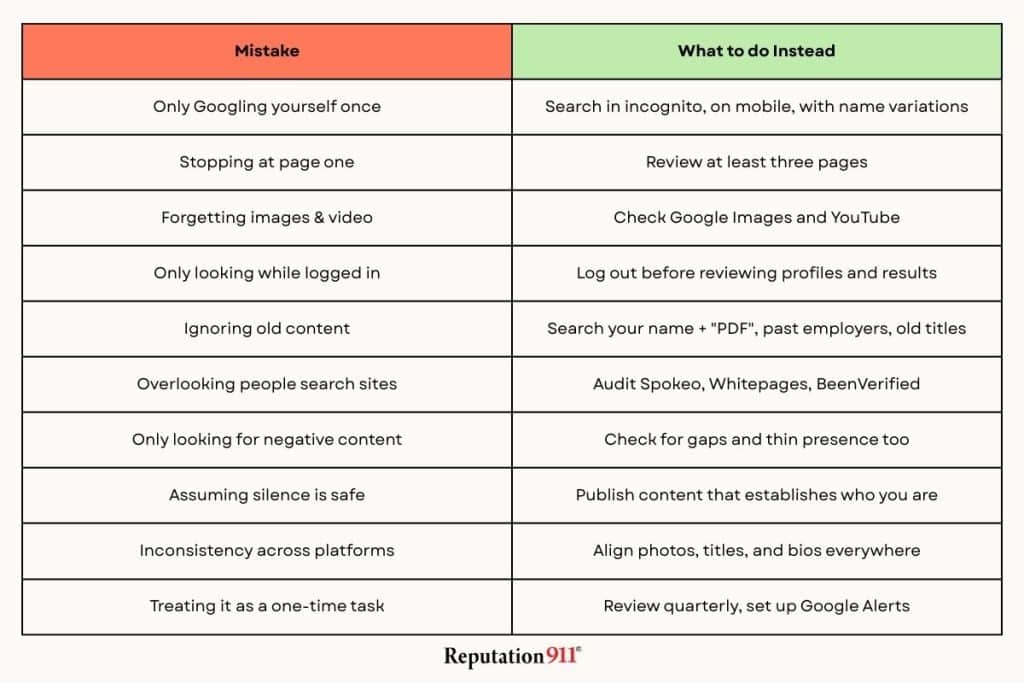
1. Only Googling Yourself Once
Search results can look very different depending on device type, location, browser history, and login status. To see what others see, search in Incognito mode, on mobile, and using common name variations or misspellings.
2. Stopping at Page One
Many recruiters, investors, and journalists go beyond the first page when researching someone. Review at least the first two to three pages to understand the full footprint of your online presence.
3. Forgetting Image & Video Search
Images and videos follow their own ranking algorithms and can surface content you may not expect. Check Google Images, YouTube, and social platforms to see which visuals are associated with your name.
4. Only Looking While Logged In
Being logged in can distort results due to privacy settings and personalization. When checking your online presence, always review your profiles and search results while logged out to see the true public-facing version.
5. Ignoring Old Content
Older PDFs, bios, press releases, and conference materials often retain strong search visibility. Search your name with terms like “PDF,” past employers, or previous titles to uncover lingering content.
6. Overlooking People-Search Sites
Data brokers and people-search sites frequently rank high and expose personal information. Audit major directories, request removals where possible, and monitor them regularly.
7. Focusing Only on “Bad Stuff”
The real risk is often an empty or thin presence rather than negative content. Proactively publish credible, authoritative material that clearly communicates who you are and what you do.
8. Assuming Silence Is Safe
A lack of visibility can raise questions about credibility, relevance, or legitimacy. Establish and maintain clear ownership of your name, bio, and professional narrative online.
9. Not Checking Your Presence Consistency
Conflicting photos, titles, or bios can subtly erode trust and professionalism. Ensure consistency across headshots, job titles, biographies, and messaging on all platforms.
10. Treating It as a One-Time Task
Search results change as new content, mentions, and profiles appear. Make monitoring your online presence a recurring habit, reviewing it at least quarterly.
The Biggest Mistake Of All?
The biggest mistake you can make is to check your online presence the way you see it, rather than how a stranger would. You already know your history, context, and intent. But a recruiter, client, or journalist might not see it that way.
They see search results, profiles, and images at face value. If something is missing, outdated, or paints you in a negative light, they will fill in the gaps themselves.
Key takeaways:
- Your online presence forms a first impression before any conversation.
- Page two and three results still matter for due diligence.
- Images, profiles, and old content shape trust fast
- What’s missing can hurt credibility as much as negative content.
- Regular monitoring prevents surprises later.
Seeing your name the way others do is the first step toward managing your reputation rather than reacting to it. Reputation911 provides discreet, professional support to address unwanted content and safeguard your public image.