
UniCourt records can linger in your online search results long after the case is over. We help remove eligible listings or suppress them so they stop appearing when someone looks up your name.
You can remove a UniCourt record if it’s been sealed, expunged, or tied to a documented safety risk, filed through UniCourt’s own Public Records Redaction Request form. If your case doesn’t qualify, search suppression can still push the listing off page one of Google.
UniCourt hosts more than 130 million public court cases, and Google can surface any one of them the moment someone searches your name. A case that’s long since closed doesn’t stay buried on its own. This guide walks through exactly how to request removal, what to do if UniCourt denies your request, and how suppression works when removal isn’t on the table.
You can remove a UniCourt record if it’s been sealed, expunged, or tied to a documented safety risk, filed through UniCourt’s own Public Records Redaction Request form. If your case doesn’t qualify, search suppression can still push the listing off page one of Google.
UniCourt hosts more than 130 million public court cases, and Google can surface any one of them the moment someone searches your name. A case that’s long since closed doesn’t stay buried on its own. This guide walks through exactly how to request removal, what to do if UniCourt denies your request, and how suppression works when removal isn’t on the table.
UniCourt is a public legal database that pulls case information from state and federal courts across the country, built mainly for attorneys, journalists, and researchers who need fast access to case records.
Here’s the catch: it also publishes personal records that show up in a Google search of your name just as easily as they show up for a lawyer doing case research.
Yes, but only under specific circumstances. UniCourt will consider removing or redacting records when:

If your record meets these criteria, UniCourt will remove or hide it from their database.
Once that happens, Google will typically update its index within a few weeks, and the record will no longer appear in search results.
If your case qualifies for removal, UniCourt makes it possible to request redaction directly through their website.
Follow these steps carefully and include accurate information to avoid delays in processing.

To submit a redaction request, you must provide the exact page you want reviewed.
The challenge is that the site makes it difficult to search for specific cases unless you have a paid account. Here’s the workaround most people use.
This is the link you will paste into the Public Records Redaction Request form.
If the URL is incomplete or points to the wrong listing, your request may be denied automatically.
Go to UniCourt’s official removal page. After reading the information carefully, scroll to the bottom of the page to fill out the form.
If you have multiple records to remove, you must complete a separate form for each.
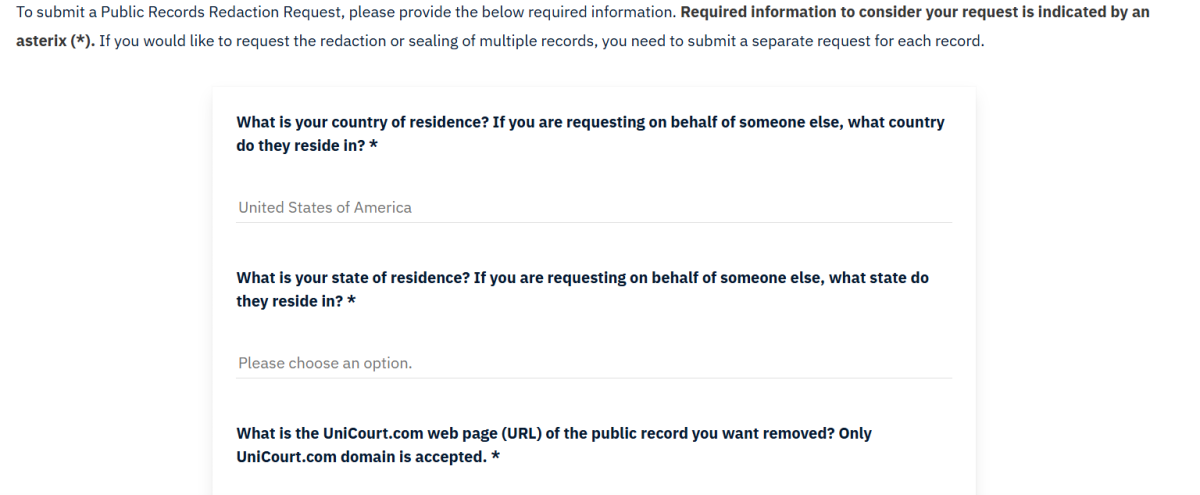
→ Fill out the form completely:
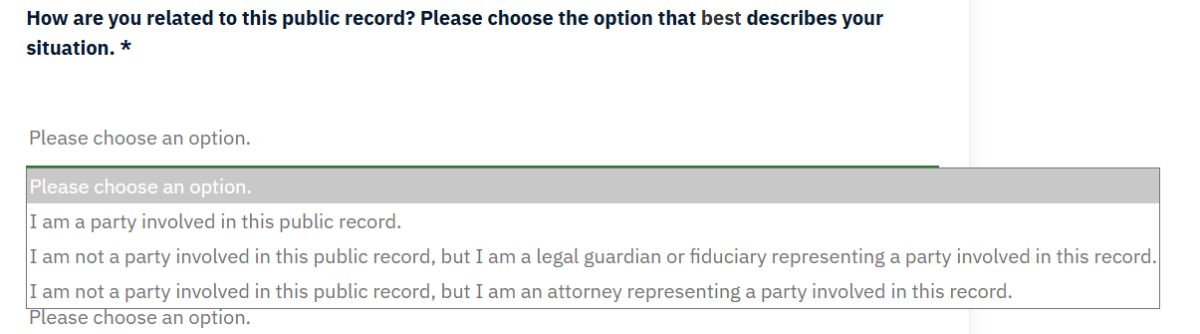
→ Indicate whether the record has been sealed by a court order.

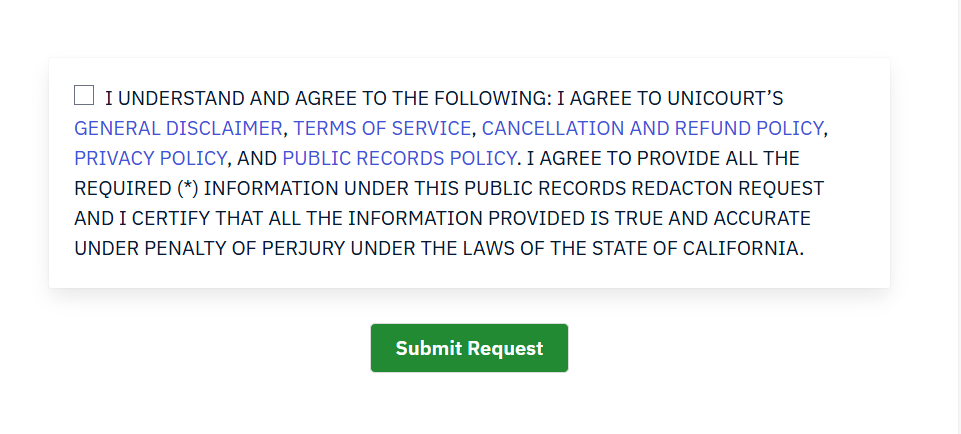
→ Finally, check the agreement box and click “Submit Request.”
After you submit the form, UniCourt will send a verification email to the address you provided.
You must open that message and click the confirmation link before your request can be reviewed.
If you skip this step, your redaction request will not be processed.
Make sure to check your inbox (and spam folder) for the verification email to avoid delays.
Once your email is verified, choose the name or party you want UniCourt to remove.
If your name appears in more than one case, you’ll need to submit a separate request for each record
This helps ensure that every listing tied to your name is reviewed and handled correctly.
Even after a record is removed or redacted, it can still appear in search results for a short time. That’s because Google needs to re-crawl and update its index.
You can speed this up.
Once the record page is removed or updated, submit the URL directly to Google using the Outdated Content Removal tool from Google.

Here’s how it works.
Strong documentation can make the difference between approval and denial. UniCourt’s team may ask for further proof that the record should be removed.
Submit only what applies to your situation. More paperwork does not always help.
Removal is not instant. Here’s what to expect so you can plan your next steps:
If your request is denied, you usually have another 30 days to submit an appeal with new evidence.
Until re-indexing finishes, the link may still appear even if the page is gone.
If UniCourt denies your request, you have a couple of options:
You can appeal the decision by submitting new or updated documentation—such as a sealed court order or proof that the case was expunged.
Without substantial new evidence, UniCourt will likely deny your request again.

If a removal request is denied, the issue is often the legal status of the case. At that point, court action may be the only path to removal. Here’s how to know when it makes sense.
Both options can qualify a record for removal from public databases. Expungement usually carries more weight, but sealed cases are often enough.
You can start by reviewing your state court’s website or contacting the clerk where the case was filed. Eligibility rules vary by state and by case type. Some states allow automatic sealing after a waiting period, while others require a formal petition and a judge’s approval. Dismissed or non-conviction cases are often easier to seal.
A lawyer can confirm eligibility, prepare the paperwork, and avoid procedural mistakes that delay approval. Talk to one when:
Once a case is sealed or expunged, you can resubmit your removal request with the court order. That documentation significantly improves your chances of success.
Removing UniCourt records from the internet can be challenging, and in many cases, complete removal isn’t feasible. When removing content from the internet isn’t possible (or the best approach), suppressing the record in Google is the next best step. Search engine suppression pushes negative listings off the first page of Google, where almost no one will see them.
At Reputation911, our search result suppression services replace unwanted results with positive, trustworthy content, cleaning up your online presence and protecting your reputation.
This approach is especially effective if your name appears on multiple court record sites such as Trellis, PacerMonitor, or Justia. We can help you take control of what shows up when people search your name.
|
Removal
|
Suppression
|
|---|---|
|
Works only if the case is sealed, expunged, or legally redacted
|
Works for any public record, even if a removal request has been denied
|
|
UniCourt reviews your request and can deny it
|
No approval needed. Suppression works regardless of court status
|
|
Listing is taken down or hidden
|
Listing stays online but gets pushed off page one of Google
|
|
Google removes the link once UniCourt updates its database
|
Google shows stronger, positive content instead of the court record
|
Seeing old court records connected to your name in Google search results can feel invasive.
It also affects your personal life, relationships, and even job opportunities–long after the case is resolved.
But, it doesn’t have to define your life forever.
At Reputation911, we believe in giving people back control over their own story online. We’ll help you clean up your search results and make sure outdated or irrelevant cases no longer define who you are today.

Most UniCourt removal requests are processed within 30 days. If your request is denied, you have another 30 days to appeal by submitting additional documentation such as a court order or proof of sealing.
Submitting a Public Records Redaction Request through UniCourt’s own form costs nothing. There’s no fee to file or verify your request. If your case doesn’t qualify for removal and you need help pursuing court sealing or search suppression instead, that’s where a paid service like Reputation911 comes in.
UniCourt won’t approve removal without a qualifying legal status. Your options are to pursue sealing or expungement through the court (a lawyer can confirm your eligibility), or use search suppression to push the listing off page one of Google while that process plays out.
Not right away. Once UniCourt updates its database, Google still has to re-crawl and re-index the page, which typically takes two to four weeks. Submitting the URL through Google’s Outdated Content Removal tool speeds that timeline up.
Yes. We help determine whether a record qualifies for removal, prepare the documentation UniCourt requires, and pursue legal sealing when it’s an option. When removal isn’t possible, we build a suppression strategy to push the listing off page one instead.
A dismissal alone doesn’t guarantee removal, since the record stays public until a court seals it. Dismissed and non-conviction cases are usually the easiest to get sealed, but you’d still need to petition the court, or confirm your state seals them automatically, before UniCourt will act on a new request.